 首页
 网站论坛圈子
 每日快讯New
 游戏下载




本游戏玩法总结
《拉面店模拟器》为 PC 单机游戏资源,适合按游戏类型、版本说明和配置要求了解实际游玩内容。
《拉面店模拟器》整体更偏向模拟经营与规划管理,核心体验通常围绕建造布局、资源分配、经营效率和持续养成展开。对于喜欢经营养成、主题建造和长期规划类单机作品的玩家来说,这类题材往往更容易形成稳定的游玩节奏。
关于此游戏
Excited to try your hand at running a ramen shop?
We’re serving a taste of the experience with our playable demo. Head over to our demo page and try it out right now!
Make sure to wishlist our game and try our demo out now! Your feedback will be essential as we continue to perfect our recipe for the full game!
Japan is beautiful this time of year
Create life again in a worn out, forgotten alley. Explore your surroundings and wander through cozy, lantern-lit backstreets and find inspiration for the task ahead. Maybe visit your local convini and look for exiting new ingredients or that unique decoration. You never know where an old recipe might be laying around.
Decorate for days
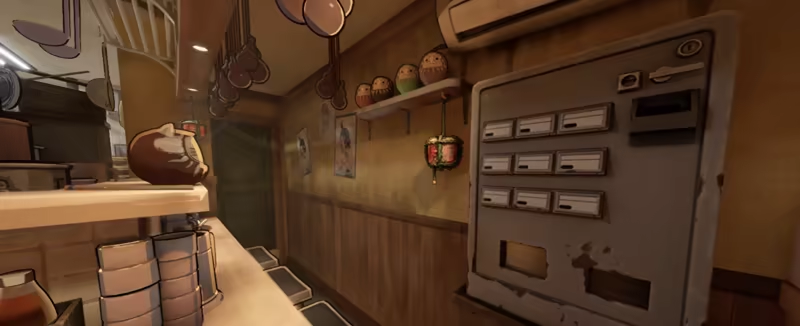
Roll up your sleeves, fix up equipment in your kitchen and paint all your old walls. Complete challenges and unlock a wide array of unique decorations, customizations and recipes. Whether you prefer a quirky, bustling diner with mismatched charm or an elegant, fine dining establishment that oozes sophistication, the choice is yours. Don’t forget to check out the gacha machine to have a chance to pull that special item!
Clean your way to the top
Clean, paint, and cook your way to the top. Hard workers have the best equipment and can afford the best ingredients. Or maybe you want to splash all the cash on 50 darumas? Just make sure to be on top of cleaning – no one enjoys a shop with dirty floors and a full trash can, your customers will notice! Sweep the floor, make sure that all your lights work and keep an eye on the toilet to maintain a clean shop.
Everything starts with a good bowl
The most important thing in a ramen restaurant is a really good bowl. Prepare all the ingredients, your amazing broth and have the best protein in town. Unlock receipts to extend you menu and earn more cash to level up your ingredient-game! Handle your menu on your restaurants kenbaiki and attract different type of customers, do basic ramen bowls really good or dive in to different types, just make sure your up to serve your customers what they ordered.
Let us cook
We are still working hard on this experience, so please join our discord and follow our social medias! We want to hear what you think and discuss everything from features to gameplay, let’s cook up something great!
游戏介绍
经营属于你自己的拉面店吧!将一条温馨却略显破旧的日本小巷,改造成充满活力的人气胜地。从擦洗地板到烹制出一碗完美的拉面,亲力亲为。精心装饰每一个角落,全面升级各项设施,打造出独一无二的拉面店。
游戏视频
游戏截图
更新记录
https://store.steampowered.com/news/app/3393720?updates=true
游戏版本信息
Build.26421103|容量5.1GB|官方简体中文|支持键盘.鼠标
常见问题FAQ
《拉面店模拟器》下载后应该怎么解压和安装?
先确认所有压缩包均已完整下载,再使用常见解压工具统一解压。不要直接在压缩包内运行程序,建议使用纯英文目录,并提前确认磁盘空间充足。具体步骤可以参考 游戏手动解压安装教程。
《拉面店模拟器》解压后打不开怎么办?
优先检查安全软件是否误拦截、文件是否解压完整、运行库是否缺失、显卡驱动是否过旧,以及系统版本是否满足要求。首次运行也可以尝试右键以管理员身份启动。
【游戏问题】游戏启动提示缺少 DLL 或运行组件怎么处理?
这类提示通常与常用运行库不完整有关。建议补全 DirectX、Visual C++ 等常见游戏运行组件,再重新启动游戏。教程可以参考 游戏常用运行库合集。
【游戏问题】启动出现黑屏、闪退、无响应或没有声音怎么办?
通常需要检查显卡驱动、运行组件、解压完整度、安装目录权限和安全软件拦截。建议先更新电脑驱动、补全运行库,并将游戏放在纯英文路径下运行。
【游戏问题】无法存档或手柄无效怎么办?
无法存档通常与目录写入权限有关,可以尝试管理员身份运行或更换可写目录。手柄无效时,请检查驱动、连接模式和游戏内控制器设置。
《拉面店模拟器》修改器在哪里下载?
是否支持修改器取决于游戏版本和修改器版本。使用前请核对版本说明,并注意部分安全软件可能会拦截修改器程序。也可以查看 WeMod 超8000+单机游戏最新修改器 的使用说明。